
Setup port forwarding using Mikrotik router
We recommend using the VPN tunnel method whenever possible.
| VPN tunnel recommended | Port forwarding | |
|---|---|---|
| ONU statuses updated | Real time | Every 7 minutes |
| Security | Maximum — all traffic encrypted | Low — Telnet and SNMP exposed on the public internet |
| Public IP address | Not required | Required (static, or dynamic + Cloud DDNS) |
| TR-069 ONT management | Available | Not available |
| Dual stack IPv4+IPv6 on ONTs | Available through TR-069 | Not available |
| OLT SNMP traps monitoring | Yes | No |
TR-069 and SNMP traps are not available using Port Forwarding option (use the VPN tunnel instead).
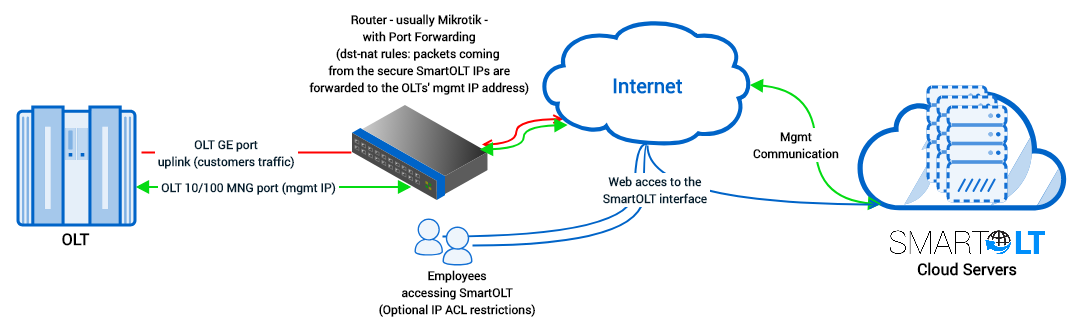
The port forwarding procedure is to create one address-list named "SmartOLT" which includes your SmartOLT domain (the IP gets autoresolved) that will be permitted to communicate with the OLTs.
1Create an address-list with SmartOLT servers
The address you use to log in to your panel.
/ip firewall address-list add address=yourcompany.smartolt.com list=SmartOLT
If you are not using Mikrotik, please contact support for the complete list of IPs to be allowed.
2Set up port forwarding
For packets received from source-address-list SmartOLT the action will be dst-nat to the OLT private IP address.
To use more OLTs on the same public IP address, increment each external port (Ex. for OLT2: 2334, 2323, 2162).
The private IP of the OLT, as reachable from the router.
/ip firewall nat add action=dst-nat chain=dstnat dst-port=2333 protocol=tcp src-address-list=SmartOLT to-addresses=192.168.200.2 to-ports=23 comment=SmartOLT

/ip firewall nat add action=dst-nat chain=dstnat dst-port=2322 protocol=tcp src-address-list=SmartOLT to-addresses=192.168.200.2 to-ports=22 comment=SmartOLT

/ip firewall nat add action=dst-nat chain=dstnat dst-port=2161 protocol=udp src-address-list=SmartOLT to-addresses=192.168.200.2 to-ports=161 comment=SmartOLT
3Allow the OLT to contact SmartOLT servers
/ip firewall nat add action=masquerade chain=srcnat dst-address-list=SmartOLT comment=SmartOLT